Synthesia vs HeyGen: Hands-On Free Plan Test
Avatar tools help when you need a talking-head lesson without filming every module. They are a different category from clip makers (Opus Clip, Vizard, etc.). On 21 Oct 2026 we rendered the same lesson script in both tools on their free plans; the results are below.
Quick answer
We tested both on 21 Oct 2026 on free plans with no card, using the same 164-word excerpt of our own lesson script, a stock avatar and the default English voice. For a free test, HeyGen wins: it let us download a watermarked 720p MP4, and on a full watch the lip sync and voice held up well. Its free plan caps videos at 1 minute and 3 videos a month, so we had to trim our script. Synthesia’s free plan allows longer videos (up to 3 minutes) and took our full script, but Download opens an upgrade prompt, so you can only share a link; use it to try the editor before you pay. If you plan to pay, Synthesia Starter ($14 a month billed yearly, $19 monthly) cost less than HeyGen Creator ($29 a month) on the day we checked. If being on camera yourself is the product, film yourself instead.
Who this comparison is for
- Coaches and course creators building modular lessons from a script
- Teams that need consistent presenters across many modules
- Anyone comparing “film yourself” vs “avatar + slides”
If your main job is cutting an existing webinar into Shorts, start with AI clip makers instead.
Our hands-on test (21 Oct 2026)
Setup. Both tools on their free plans, signed up with email, no card. Same input: a 164-word excerpt of an original LessonBench lesson script (“How to write a course outline in 15 minutes”), so we hold all the rights to it. Stock avatar, default English voice, no other edits. Render times are wall-clock from clicking Generate or Submit to the video being ready.
| Tested 21 Oct 2026 | Synthesia | HeyGen |
|---|---|---|
| Plan tested | Basic, “Free forever” ($0), no card | Free ($0), no card |
| Free-plan limits shown | 10 min of video a month, up to 3 min per video, 500 credits a month | 3 videos a month, up to 1 min each |
| Our script | Full script (about 70 s) accepted without trimming | Our 65.6 s script was blocked by the 1-minute limit. We trimmed it to 53.6 s in the editor; the finished video was 42.5 s |
| Render time | About 12 min: it sat at “Preparing scenes and assets” (18%) for 9–10 min, then finished in about 1.5 min | About 8.5 min or less (62% after about 2 min) |
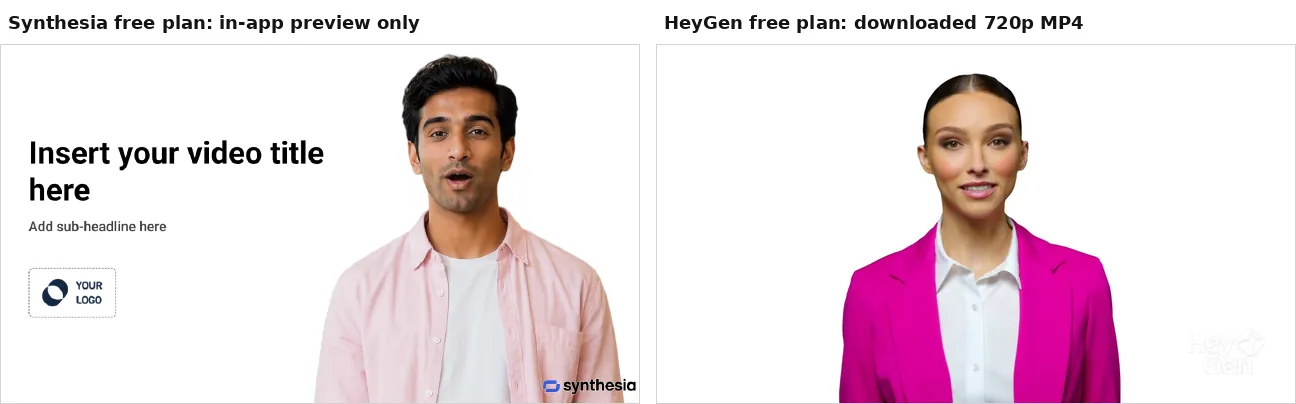
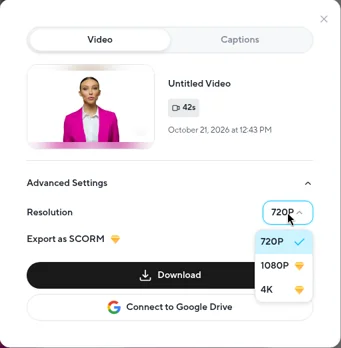
| Download on the free plan | Blocked. Download opens a “Starter+” upgrade prompt; you can only share a link | Works. 720p MP4 (1280×720) with audio. 1080p, 4K and SCORM export are locked |
| Watermark | Synthesia watermark | HeyGen watermark, bottom right, translucent and subtle |
| Resolution | Not stated in the app | 720p on the free plan |
| Lip sync and voice | Checked only in frames sampled from the in-app preview: mouth shapes varied and looked in sync at the frames we checked. We could not download the video, so we did not do a full listen | We watched the full download. Lip sync was excellent with no noticeable desync; the voice was natural and warm, with correct pronunciation |
| Presenter motion | Not assessed (preview frames only) | Subtle nods and head tilts, a bit repetitive and stiff; hands out of frame; no visual glitches |
| Quirks | Not assessed (no download) | The video ends abruptly on the last word. Tip: add a short pause at the end of your script |
| Cheapest paid plan (USD, as shown 21 Oct 2026) | Starter: $14/month billed yearly ($19 monthly). 1,250 credits a month, downloads, no watermark, videos up to about 12 min | Creator: $29/month (monthly price shown). 600 credits, 1080p export, branding removed, custom avatar |
| Next plan up | Pro: $59/month billed yearly ($89 monthly). Enterprise: custom | Pro: $49/month (monthly price shown). 4K, videos up to 30 min |
HeyGen’s plan picker also advertises 500+ ready-made presenters and 30+ languages, and its annual toggle says “2 Months Free”; we did not record HeyGen’s annual prices. Plans change, so check each pricing page before you buy.
Not tested: custom or personal avatars, translation and dubbing, adding slides or B-roll inside the tool, captions export, and anything on paid plans.
Choose Synthesia if…
- You are ready to pay and want the lower entry price: Starter was $14/month billed yearly ($19 monthly) with downloads, no watermark and videos up to about 12 minutes.
- Your lessons run longer than a minute and you want to try the editor on a full module script first. The free plan took our whole script and allows up to 3 minutes per video, but you can only share a link.
Choose HeyGen if…
- You want a free test that ends with a file you can actually use: a watermarked 720p MP4.
- Your clips are short (lesson teasers, intros, one-minute explainers). The free plan caps each video at 1 minute and 3 videos a month.
- Delivery matters most: in our full watch, lip sync and voice held up well. Add a pause at the end of your script so the video doesn’t cut off on the last word.
Film yourself instead if…
The authenticity of you on camera is the product. Avatars won’t fix a weak outline.
Our pick after testing
For a free test, HeyGen wins. You can download a usable (watermarked, 720p) clip, and the lip sync and voice held up on a full watch. Synthesia’s free plan allows longer videos (3 minutes against 1), but you can only share a link, so treat it as a way to try the editor before paying. If you’re paying, Synthesia Starter ($14/month billed yearly, $19 monthly) cost less than HeyGen Creator ($29/month) on 21 Oct 2026; compared month to month, that is $19 against $29. Commissions never decide the order.
Related: Webinar → clips · How we test
Affiliate disclosure: LessonBench may earn a commission when you buy through some links on this page, at no extra cost to you. This never changes our picks. Commissions never decide rankings; tools without affiliate programs stay if they fit. We don’t publish fake reviews or invented results.