Descript vs Riverside for Course Creators
These products overlap but are not twins. Descript is strongest as a text-based editor for footage you already have. Riverside is strongest as a remote recorder with post tools (including Magic Clips). On 21 Oct 2026 we ran Descript’s free plan on our own sample lesson; the results are below. Riverside is not tested because it had no free plan to test.
Quick answer
We tested Descript on its free plan on 21 Oct 2026 with our own 3:46 sample lesson. The upload took about 8 seconds, the transcript was ready in under a minute, and it matched our script word for word (0% word error rate on a clean, synthetic narration, so real recordings will be harder). Filler-word removal and Studio Sound both run on the free plan, but exports are capped at 720p with a Descript watermark, and we had to publish a share link before we could download. Hobbyist ($16 a month billed yearly, $24 monthly) unlocks 1080p without the watermark. Riverside is not tested: its pricing page showed no free plan and the 14-day trial asked for a card. Choose Descript if your bottleneck is editing a lesson file you already have; choose Riverside if your bottleneck is recording remote guests or students on clean separate tracks.
At a glance (roles, not rankings)
| Descript | Riverside | |
|---|---|---|
| Primary job (typical) | Edit video/audio like a doc; filler removal, Studio Sound, clips | Record guests/lessons in high quality, then edit/clip |
| Best starting point | You already have a recording file | You need reliable remote recording first |
| Clipping angle | Clips from an edited transcript timeline | Magic Clips / studio workflow after capture |
| LessonBench status | Tested 21 Oct 2026 (free plan) | Not tested: no free plan |
| Try | Descript | Riverside |
Our hands-on test: Descript (21 Oct 2026)
Setup. Descript’s Free plan, signed up with email, no card. Input: our own 3:46 sample lesson (“How to write a course outline in 15 minutes”: slides plus a synthetic narrator voice, 1080p MP4), so we hold all the rights to it. Default settings. Times are wall-clock.
| Tested 21 Oct 2026 | Descript (Free plan) |
|---|---|
| Plan tested | Free ($0), no card |
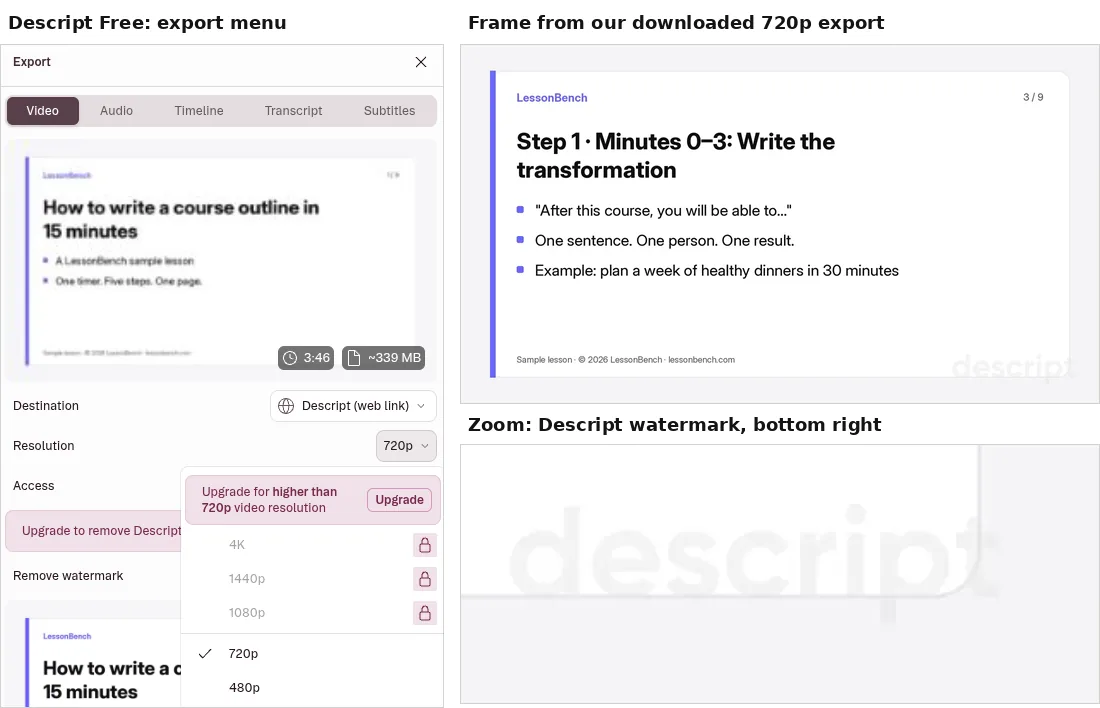
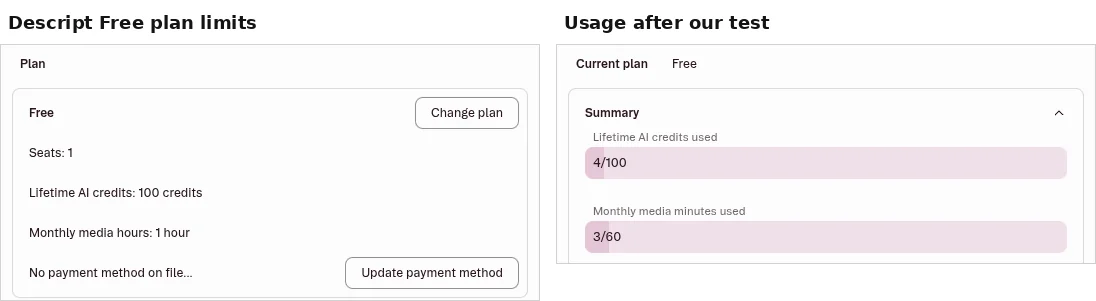
| Free-plan limits shown | 1 seat, 60 media minutes a month, 100 AI credits in total (lifetime, not monthly) |
| Upload | About 8 s for our 3:46 MP4 (6.4 MB) |
| Transcription | Ready about 6 s after adding the file to the script; under a minute from upload to transcript |
| Transcript accuracy | 0 word errors in 529 words (0% word error rate, ignoring case and punctuation). Only punctuation and paragraph breaks differed, e.g. a three-item list became separate sentences. No speaker label was added automatically. Our narration is a clean synthetic voice, so real recordings will be harder |
| Remove filler words | Available on Free. It found 0 filler words, which is correct: our script has none. So we could not judge how well it cuts real “ums” |
| Studio Sound (AI audio clean-up) | Ran on Free and used 4.5 AI credits. We did not rate the sound, because our narration was already clean |
| Usage after the test | 4 of 100 lifetime AI credits, 3 of 60 monthly media minutes |
| Export resolution | 720p or 480p. 1080p, 1440p and 4K locked (“Upgrade for higher than 720p”). Our download: 1280×720 MP4 with audio, 3:46 |
| Watermark | Descript watermark, bottom right, faint |
| Getting the file | We had to publish the video to a Descript share link before Download appeared; about 3.5 min including publishing. You can unpublish afterwards (we did) |
| Sign-up | Our first attempt showed “Unauthorized action”. Descript support suggested a clean browser without extensions, and that worked |
| Cheapest paid plan (USD, as shown 21 Oct 2026) | Hobbyist: $16/month billed yearly ($24 monthly). 10 media hours and 400 AI credits a month, 1080p export without the watermark |
| Next plans up | Creator: $24/month billed yearly ($35 monthly), 30 media hours, 800 AI credits, 4K export. Business: $50/month billed yearly ($65 monthly) |
Not tested: Overdub and voice cloning, the Underlord AI co-editor, clip creation, multitrack editing, remote recording, translation and dubbing, captions export, filler removal on real speech, and anything on paid plans.
Riverside: not tested
Riverside is not tested. When we checked on 21 Oct 2026, its pricing page showed no free plan, and starting the 14-day Pro trial asked for a card or PayPal before we could record anything. We only test on free plans and no-card trials, so we stopped there. Prices: Pro $35 a month billed monthly or $29 a month billed yearly, Grow $45 or $36, and Webinar $99 or $79 (USD, per Riverside’s pricing page, Oct 2026). Until we can test it for free, we describe Riverside from its published features only.
Choose Descript if…
- Your bottleneck is editing a finished webinar or lesson file
- You want to delete mistakes by deleting text: in our test the transcript was ready in under a minute and matched our script word for word
- You want to try before paying: the free plan covers about an hour of uploads a month, but plan on Hobbyist ($16/month billed yearly) if you need 1080p without a watermark
Choose Riverside if…
- Your bottleneck is getting clean separate tracks from remote guests or students
- You want recording + light post in one place
- You already run interviews / co-taught sessions weekly (budget for a paid plan: we saw no free plan)
When you might need both
Some creators record in Riverside and finish heavy edits in Descript (or a clip tool). That only pays off if each step saves real time. If your lessons are already recorded, Descript alone covers transcript-based editing.
Verdict
No head-to-head winner, because Riverside is not tested. Descript on its own: a good free way to try text-based editing on a short lesson. The transcript was fast and, on our clean narration, perfect. Budget for Hobbyist if you publish the result, since the free plan stops at 720p with a watermark. Commissions never decide the order.
Related: Best AI clip makers · Webinar → clips workflow · How we test
Affiliate disclosure: LessonBench may earn a commission when you buy through some links on this page, at no extra cost to you. This never changes our picks. Commissions never decide rankings; tools without affiliate programs stay if they fit. We don’t publish fake reviews or invented results.